Skip to content
  • Pitcherific
  • Articles
  • Support
  • Try the pitch tool
  • Before You Pitch
  • Body Language
  • Situations
  • Techniques

How do I cancel my Pitcherific PRO subscription?

View Categories
  • Home
  • Docs
  • Advanced
  • How do I cancel my Pitcherific PRO subscription?

How do I cancel my Pitcherific PRO subscription?

< 1 min read

First, log into your Pitcherific account on the website. From there, click on My Account in the upper-right corner of your screen.
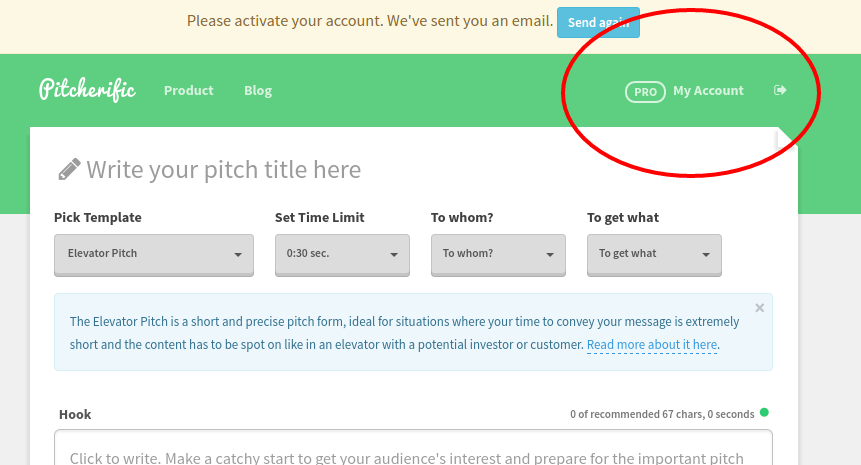
Cancelling your PRO subscription - Part 1

In the window that appears, follow the Downgrade instructions in the lower right area. When completed, your Pitcherific PRO subscription will be cancelled.
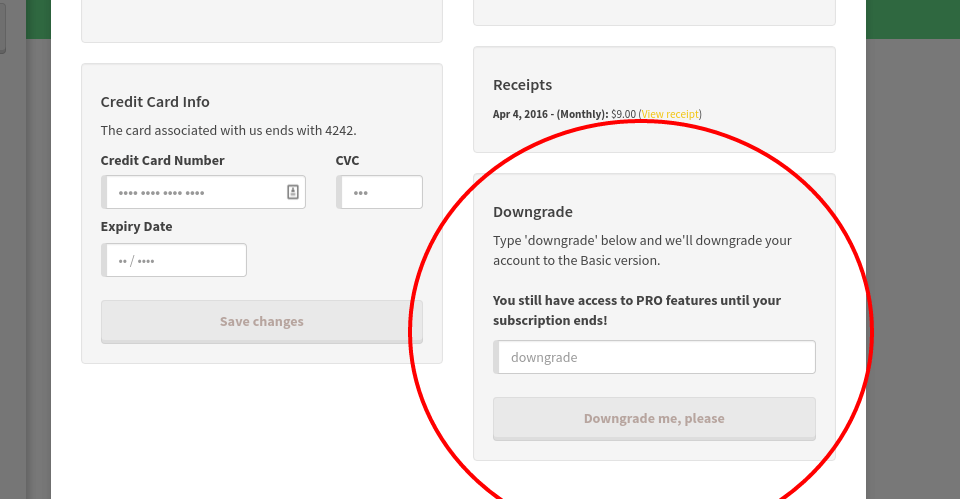
Cancelling your PRO subscription - Part 2

Remember, you will still be able to use the Pitcherific PRO features until your subscription expires.

Updated on April 4, 2016

What are your Feelings

  • Happy
  • Normal
  • Sad

Share This Article :

  • Facebook
  • X
  • LinkedIn
  • Pinterest
Streamlining your team’s pitches with Master PitchesHow do I make a copy of my pitch?

Pitcherific's innovative pitch tool helps entrepreneurs, students, and job seekers prepare an effective pitch. Convince your potential investors, customers or employer today

See how it works
© 2026 Pitcherific